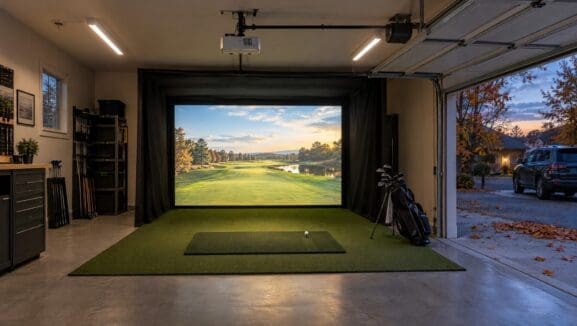

How Golf Simulators Work: Complete Guide to Tracking Technology & Launch Monitors
Quick Answer: Golf simulators use three main tracking technologies: Doppler radar (TrackMan, FlightScope), photometric cameras (Foresight GCQuad, SkyTrak+), and infrared overhead systems (Uneekor EYE series). These launch monitors capture ball flight and club data, which sophisticated software algorithms translate into realistic virtual golf experiences. To compare simulator technologies and find facilities near you, visit GolfSimSpot.com for verified listings with user reviews.
Table of Contents
- How Golf Simulators Work: The Big Picture
- Doppler Radar Technology Explained
- Photometric Camera Systems
- Infrared Overhead Tracking
- Hybrid & Dual-Technology Systems
- How Simulator Software Processes Data
- Projection Technology & Impact Screens
- Understanding Accuracy & Data Metrics
- Choosing the Right Technology for Your Needs
- Frequently Asked Questions
- Citations & Sources
How Golf Simulators Work: The Big Picture
Golf simulators feel almost magical when you first experience one—you hit a real golf ball into a screen a few feet away, yet somehow the system knows exactly how far it would have traveled, whether it curved left or right, and where it would have landed on an actual golf course. The technology orchestrating this illusion involves multiple sophisticated systems working in perfect synchronization, each handling a specific aspect of translating your physical swing into virtual reality.
At the core of every simulator sits a launch monitor—the device responsible for capturing data about your ball flight and club movement. This launch monitor uses one of three primary tracking technologies: Doppler radar that literally follows your ball through the air, high-speed cameras that photograph the ball and club at impact, or infrared sensors that detect ball movement from overhead positions. Each technology has distinct strengths and limitations that affect accuracy, usability, and price.
Once the launch monitor captures your shot data—metrics like ball speed, launch angle, spin rate, and direction—powerful software algorithms take over. These programs use physics models to calculate how your ball would behave under real-world conditions, simulating air resistance, wind effects, terrain interaction, and eventual landing position. The software then renders this calculated ball flight as realistic 3D graphics projected onto your impact screen, creating the visual experience of watching your shot fly down a fairway or toward a green. Modern simulators handle this entire process—from club impact to visual feedback—in under one second, making the experience feel immediate and natural despite the complex computations happening behind the scenes.
Doppler Radar Technology Explained
How Radar Launch Monitors Track Golf Balls
Doppler radar launch monitors, pioneered by TrackMan and refined by competitors like FlightScope, use the same fundamental physics that weather radar and police speed guns employ. The device emits microwave radio signals that bounce off your moving golf ball, with the returning signal’s frequency shift revealing the ball’s velocity, trajectory, and spin characteristics. This happens continuously during ball flight, allowing radar systems to track balls from immediately after impact until they land.
The technical elegance of radar tracking lies in its directness—the system literally measures what’s happening to the ball in real-time rather than inferring flight from impact data. TrackMan’s radar, for instance, samples your ball’s position thousands of times during flight, building an extraordinarily accurate picture of trajectory, apex height, descent angle, and landing characteristics. This makes radar systems particularly valuable for outdoor use, where balls fly their full distance and the technology captures complete flight data rather than relying on calculations based on initial launch conditions.
“The thing about TrackMan that blew my mind was seeing how much my outdoor numbers differed from what I thought they were. The radar doesn’t lie—my 7-iron wasn’t really carrying 170 yards like I believed.”
— u/data_driven_golfer, Reddit r/Golf
For indoor simulator use, radar systems face a fundamental challenge: balls don’t actually fly their full distance before hitting screens 10-15 feet away. To work around this limitation, radar launch monitors measure ball speed, launch angle, and spin during the first few feet of flight, then use sophisticated algorithms to calculate where the ball would have landed outdoors. Modern radar units like the TrackMan 4 have refined these calculations to the point where indoor and outdoor data typically match within 2-3% for most shots—impressive given the extrapolation involved.
Advantages of Radar Technology
Radar launch monitors excel in several specific scenarios that make them popular despite premium pricing. Their portability stands out—units like the TrackMan 4 or FlightScope Mevo+ sit on tripods behind your hitting area and work equally well on driving ranges, golf courses, or indoor simulators without reconfiguration. Teaching professionals particularly value this flexibility, using the same unit for outdoor lessons, indoor fitting sessions, and on-course playing lessons without changing setups or recalibrating.
The technology also captures certain data points that camera systems struggle with or miss entirely. Attack angle—the up or down direction your club is moving through impact—requires tracking club movement before and after ball contact, which radar handles naturally. Low point measurement, club path relative to target line, and face-to-path relationships all benefit from radar’s ability to track both ball and club through extended portions of the swing rather than just freezing a single moment at impact.
Limitations to Consider
Despite their capabilities, radar systems come with trade-offs that affect usability for certain applications. They require significant space behind the ball—typically 8-10 feet of clearance for the unit itself plus sight lines to track ball flight. This makes them challenging for tight indoor spaces where ceiling-mounted or side-positioned alternatives work better. Radar also demands consistent lighting conditions to function optimally; extreme backlighting or very dark environments can interfere with the optical components that help the radar distinguish your golf ball from background clutter.
Cost represents another consideration. Quality radar launch monitors start around $2,000 for basic models like the Rapsodo MLM2 Pro and climb to $20,000+ for professional units like TrackMan 4. The premium reflects both the sophisticated radar components and the software development required to translate raw radar data into actionable golf metrics. For home simulator builders on tighter budgets, camera-based alternatives often deliver comparable accuracy for specific use cases at substantially lower price points.
Photometric Camera Systems
How High-Speed Cameras Track Ball Flight
Photometric launch monitors use high-speed cameras—typically operating at 3,000 to 10,000 frames per second—to capture multiple images of your golf ball immediately after impact. Advanced image processing software analyzes these photos to determine ball speed, launch angle, and spin characteristics by measuring how the ball’s position and dimple patterns change between sequential frames. The Foresight GCQuad, for instance, uses four synchronized cameras (hence “quadrascopic” imaging) to triangulate ball position and rotation with exceptional precision.
The key advantage of camera systems lies in their measurement method—they’re photographing actual events rather than interpreting reflected signals. This direct visual capture eliminates certain variables that can affect radar accuracy, particularly with short shots like chips and pitch shots where slower ball speeds and limited flight distances challenge radar tracking. Camera systems excel at measuring spin, capturing the exact rotation visible in their high-speed images rather than inferring spin from radar signal characteristics.
Most photometric systems position to the side of the ball, sitting on the ground 18-24 inches away from your hitting area. SkyTrak+, one of the most popular mid-tier camera units, exemplifies this configuration—you set it perpendicular to your target line, pointing at the impact zone, and it photographs balls as they pass through its field of view. This side positioning keeps the unit completely out of your swing path while maintaining clear sight lines to capture necessary ball data.
The Club Tracking Challenge
Where photometric systems traditionally struggled was club tracking. While cameras excel at photographing balls—which are small, white, and easily distinguishable against dark hitting mat backgrounds—golf clubs present more complex challenges. Club heads move faster than balls (often 90-110 mph for drivers compared to ball speeds of 140-170 mph), they’re larger and less geometrically consistent, and they don’t maintain steady positions long enough for cameras to capture clean images at standard frame rates.
Most camera-based launch monitors solve this through club marking—small metallic or reflective stickers applied to the club head that cameras can track easily. The Foresight GCQuad requires these stickers for full club data, as do many competing systems. While applying stickers takes only seconds, some golfers dislike the aesthetics or find the requirement inconvenient when switching between clubs frequently or letting friends hit shots with their equipment.
Recent innovations are eliminating club marking requirements through AI-powered image recognition. Uneekor’s newest systems use machine learning algorithms trained to recognize club head shapes and movements without markers, though these AI solutions currently cost substantially more than systems requiring traditional marking methods.
Indoor Optimization
Unlike radar units designed to work both indoors and outdoors, most photometric systems are purpose-built for indoor simulation. They don’t need to track full ball flight—instead, they capture data during the first 18-24 inches after impact and use physics models to calculate complete trajectories. This optimization allows photometric launch monitors to deliver exceptional accuracy in indoor environments while maintaining compact form factors and straightforward setup requirements.
The indoor focus also enables interesting innovations like trouble mat compatibility. Systems like the Uneekor EYE XO series can detect when you’re hitting from specialized mats simulating rough, bunker, or tight lies, automatically adjusting calculations to match how balls behave from these conditions. This level of realism—where your simulator distinguishes between flush fairway contact and rough lies—represents substantial advancement over older systems that treated all shots identically regardless of simulated turf conditions.
Infrared Overhead Tracking
The Overhead Mounting Advantage
Infrared overhead launch monitors like the Uneekor EYE XO and newer EYE XO2 mount to your ceiling directly above and behind your hitting area, looking down at balls and clubs from elevated positions. This overhead perspective solves several challenges that side-mounted or rear-mounted systems face, particularly around spatial requirements and hitting zone freedom. You can position yourself anywhere within a generous hitting area—the EYE XO2 offers a 28″ x 21″ capture zone—without worrying about precise ball placement or stepping into the launch monitor’s sight lines.
The infrared component refers to these systems’ lighting technology. Rather than relying on ambient room lighting or external strobes, infrared overhead units include built-in NIR (near-infrared) LED arrays that flood the hitting zone with invisible light. High-speed cameras tuned to infrared frequencies capture images using this controlled lighting, ensuring consistent image quality regardless of room lighting conditions. You could practice in complete darkness—with just your projected course visuals for illumination—and the infrared cameras would still track every shot perfectly.
“Switched from SkyTrak to Uneekor EYE XO and the overhead setup is so much cleaner. No device sitting next to the mat, no worrying about alignment, and the infrared means I don’t need to blast my garage with lights anymore.”
— u/simsetup2023, Reddit r/Golfsimulator
This mounting configuration particularly appeals to permanent home simulator installations where ceiling mounting doesn’t pose logistical challenges. Once installed, overhead units become invisible parts of your setup—no equipment cluttering your hitting area, no tripods to move when multiple players rotate through, and no risk of accidentally hitting the launch monitor with a club during practice swings. Commercial facilities appreciate these benefits even more, as overhead mounting prevents customer interference and eliminates the space and setup considerations that portable units require.
Dimple Optix and Ball Tracking Innovation
Uneekor’s proprietary Dimple Optix technology represents one of the cleverest innovations in golf simulator tracking. Rather than marking balls with dots or requiring specially manufactured balls, the system uses your ball’s own dimples as tracking markers. The high-speed infrared cameras photograph dimple patterns as balls rotate, with software algorithms analyzing how those patterns shift between frames to calculate precise spin rates and spin axis measurements.
This approach delivers practical advantages beyond just convenience. You can practice with any golf balls—range balls, premium tour balls, old scuffed practice balls—without performance differences based on ball marking quality or marker placement accuracy. Friends visiting your simulator don’t need instruction about using special equipment; they just grab balls from your basket and start hitting. The system even generates replay videos showing exact impact moments and initial ball rotation, providing visual feedback that helps golfers understand why shots behaved as they did.
The Trade-Off: Fixed Installation Requirements
The primary limitation of overhead infrared systems is their permanent installation requirement. Unlike portable radar or side-mounted camera units that you can set up and break down as needed, overhead units mount semipermanently to ceiling structures. This works brilliantly for dedicated simulator rooms but creates challenges for shared spaces, garage simulators that double as parking areas, or teaching professionals who need equipment mobility for outdoor lessons and range work.
Installation also demands careful planning around ceiling height, electrical routing for Power over Ethernet connections, and precise positioning to ensure the unit’s field of view covers your entire hitting zone without ceiling obstructions. Most manufacturers recommend professional installation—which adds $500-1,500 to your total investment—to ensure proper positioning, secure mounting that withstands ball impacts vibrating through ceiling structures, and correct calibration that maximizes the system’s expanded capture area.
Hybrid & Dual-Technology Systems
Combining Radar and Camera Benefits
The newest evolution in launch monitor technology combines multiple tracking methods in single units, leveraging each technology’s strengths while compensating for weaknesses. TrackMan iO exemplifies this hybrid approach—it mounts overhead like infrared systems but incorporates both dual high-speed cameras and radar technology (TrackMan calls this Optically Enhanced Radar Tracking or OERT) to track balls and clubs simultaneously.
The synergy proves powerful: cameras capture club data that radar alone would miss or measure less accurately, while radar tracks ball flight characteristics with the precision TrackMan built its reputation on. The dual-technology design also enables faster data processing—TrackMan iO displays shot results in just 0.7 seconds compared to 2.7 seconds for the portable TrackMan 4, creating more natural practice rhythm where feedback appears almost instantaneously rather than noticeable delays that can disrupt swing thoughts or practice flow.
These hybrid systems typically cost more than single-technology alternatives—TrackMan iO packages start around $20,000-25,000—but the premium delivers measurable advantages for users who prioritize both data completeness and user experience quality. You get comprehensive metrics without club marking requirements, overhead mounting convenience without sacrificing outdoor-validated accuracy standards, and professional-grade performance in compact packages suitable for home installations.
When Hybrid Technology Makes Sense
Hybrid launch monitors particularly benefit two user groups: serious players who want every available data metric for swing analysis and improvement, and commercial facilities where ease of use and customer experience quality justify premium equipment costs. The no-marking convenience means customers at golf lounges or teaching studios can book sessions and start hitting immediately without staff explaining marker placement or dealing with adhesive residue. The comprehensive data appeals to club fitters and coaches who need attack angle, dynamic loft, face-to-path relationships, and impact location measurements—metrics that single-technology systems might not capture reliably.
For home users on tighter budgets, the incremental benefits of hybrid technology may not justify the substantial cost increase over capable single-technology alternatives. If you primarily play virtual courses for entertainment and track basic improvement metrics like carry distances and dispersion patterns, a $2,000 photometric unit or $2,500 radar monitor delivers 90% of what you need at 10-15% of hybrid system costs. The decision hinges on whether the additional data metrics and enhanced user experience matter enough to warrant the investment difference.
How Simulator Software Processes Data
From Raw Data to Realistic Golf
Launch monitors—regardless of tracking technology—output streams of numerical data: ball left the clubface at 152 mph, launched at 14.3 degrees, spinning at 2,847 rpm with 4.2 degrees of left spin axis. Your simulator software takes these numbers and performs remarkably complex calculations to predict exactly how that ball would behave under real-world physics, accounting for air density, wind effects, terrain interactions, and dozens of other variables that affect ball flight outdoors.
The physics modeling involved is genuinely sophisticated. Modern simulators like GSPro or Full Swing GOLF simulate golf balls as dynamic 3D objects affected by Magnus force (the lift and drift caused by spin), drag coefficients that change based on ball velocity and surface roughness, and gravitational effects modified by altitude and temperature. They model how balls behave when landing on firm fairways versus soft greens, how they react hitting slopes, and how they roll out based on ground firmness and grass length.
The rendering pipeline then visualizes these physics calculations as realistic 3D graphics. You see your ball arc through virtual sky, cast shadows on terrain below, splash when finding water hazards, or nestle into rough grass complete with subtle animations that sell the illusion. Premium software platforms render these visuals in 4K resolution at 60+ frames per second, creating smooth motion that looks and feels like watching real golf rather than obvious computer graphics. The entire process—from launch monitor detecting impact to final ball position rendering on screen—happens fast enough that most golfers perceive it as instantaneous rather than noticing the complex computations occurring milliseconds behind the visuals.
Course Modeling and Environmental Variables
Beyond ball flight physics, simulator software must accurately represent golf courses themselves. Top platforms use LIDAR scanning technology to create precise digital replicas of real courses—GSPro’s community has produced over 1,000 courses mapped this way, with elevation changes accurate to inches and green contours matching actual putting surfaces golfers encounter when playing these courses in person.
The software also simulates environmental variables that affect real golf: wind speed and direction that alter ball flight mid-trajectory, temperature and altitude adjustments that change how far balls carry, course conditions like firm-and-fast summer setups versus soft spring conditions, and even time-of-day lighting that changes visual appearance without affecting gameplay. Advanced systems let you customize these variables before rounds—play Pebble Beach in calm morning conditions or try it during typical afternoon winds that make the back nine dramatically more challenging.
The Putting Challenge
Putting represents the most difficult aspect of golf simulation because launch monitors that excel at full shots often struggle with slow-rolling putts. Camera systems lose tracking when balls move too slowly or don’t capture enough frames to calculate precise speeds from short putting strokes. Radar units designed for ball speeds exceeding 50 mph can’t reliably track putts rolling at 3-5 mph. And yet putting comprises roughly 40% of strokes in actual golf rounds—ignoring it creates incomplete simulation experiences.
Modern simulators address this through specialized putting modes and dedicated putting sensors. Some systems use separate mats with embedded optical sensors that detect putter face angle, path, and impact location, then calculate how the ball would roll based on these swing metrics. Others rely on advanced camera algorithms specifically tuned for low-speed ball tracking, accepting lower accuracy compared to full shots but still providing functional putting that lets you complete virtual rounds. The newest high-end systems like Full Swing have developed “Advanced Putting Realism” that transitions balls seamlessly from physical putting strokes to virtual greens, maintaining visual continuity that earlier systems struggled with.
Projection Technology & Impact Screens
Projector Requirements for Quality Simulation
The projection system in your simulator creates the visual world you’re playing golf within, and its quality dramatically affects enjoyment and realism. You need sufficient brightness to overcome ambient room lighting—minimum 2,500-3,000 lumens for rooms with controlled lighting, 3,500+ lumens for spaces with windows or bright overhead lights. Resolution matters significantly: 1080p projectors provide acceptable image quality, but 4K units deliver noticeably sharper course details, more readable on-screen data, and enhanced realism that justifies their premium pricing for dedicated simulator rooms.
Throw distance—how far your projector sits from the screen—determines your space requirements and mounting options. Standard throw projectors need 12-15 feet of distance to create 10-12 foot wide images, which works poorly for typical garage or basement simulators. Short-throw projectors project large images from just 4-6 feet away, typically mounting on ceilings above hitting mats. Ultra-short-throw units can sit mere inches from screens, though these specialized projectors cost substantially more and can create geometric distortions that simulator software must compensate for.
Laser projectors represent the premium choice for serious installations. Unlike lamp-based projectors that dim progressively over 3,000-5,000 hours and require $200-400 bulb replacements, laser units maintain consistent brightness for 20,000+ hours with zero maintenance. They also power on instantly without warm-up periods, start up silently without noisy cooling fans, and deliver more vibrant colors that make virtual courses look genuinely impressive. Models like the BenQ LK936ST ($3,200) or Optoma ZU660 ($3,500) exemplify this category—expensive upfront but cost-effective long-term for simulators seeing regular use.
Impact Screen Materials and Physics
Your impact screen serves dual purposes: containing golf balls safely while providing a smooth projection surface that doesn’t distort images or create visual artifacts. The material engineering involved balances competing requirements—soft enough to absorb driver impacts without excessive bounce-back that could damage launch monitors, taut enough to remain flat for distortion-free projections, and textured appropriately to prevent projector hot-spots while maintaining image clarity.
Basic impact screens use woven polyester or nylon fabrics, acceptable for occasional use but prone to developing visible wear patterns where balls hit repeatedly. Mid-tier screens incorporate multi-layer vinyl construction with reinforced backing that distributes impact forces more evenly, extending lifespan to 5-7 years of regular use. Premium ballistic nylon screens—materials originally developed for military applications—provide near-indestructible durability for commercial facilities or home users who practice daily.
Screen tension profoundly affects both safety and image quality. Properly tensioned screens absorb ball energy effectively, producing satisfying “thud” sounds and minimal ball rebound. Loose screens create dangerous bounce-back that can damage equipment or injure players, while also developing wrinkles that create visible lines in projected images. Most DIY builders struggle with achieving and maintaining proper tension, which explains why pre-fabricated commercial enclosures—despite higher costs—deliver reliably better results than homemade alternatives often manage.
Understanding Accuracy & Data Metrics
What “Accurate” Really Means
Launch monitor specifications frequently claim “tour-level accuracy” or “±1% precision,” but understanding what these numbers actually mean helps set realistic expectations. When TrackMan states ball speed accuracy of ±0.5 mph, that means if your actual ball speed is 150 mph, their unit will measure somewhere between 149.5-150.5 mph—impressive precision that matters for professional club fitting where 1 mph differences affect equipment recommendations.
But accuracy varies by metric and tracking technology. Most launch monitors measure ball speed and carry distance within 2-3% of actual values, which is excellent for practical purposes. Spin measurements prove more challenging—especially side spin and spin axis that require detecting ball rotation in multiple dimensions. Camera systems that visually observe dimple rotation tend to measure spin more accurately than radar units inferring spin from signal characteristics, though premium radar monitors like TrackMan have refined algorithms to competitive levels.
Club data accuracy depends heavily on whether your launch monitor actually tracks clubs or infers club metrics from ball flight. Systems that photograph or radar-track club heads directly—like Foresight GCQuad with club markers or TrackMan’s radar following club movement—deliver reliable attack angle, club path, and face angle data. Launch monitors that calculate club metrics based on observed ball behavior provide useful estimates but can’t match the precision of direct club measurement, particularly for analyzing specific swing faults or optimizing club fitting decisions.
Data Metrics That Matter Most
Launch monitors track anywhere from 8 to 40+ data points per shot, but most golfers benefit from focusing on core metrics that directly affect performance:
- Carry distance — How far your ball flies before first landing, the most actionable metric for club selection and course management
- Ball speed — Your efficiency at transferring club speed to ball speed, revealing swing mechanics quality beyond just swinging hard
- Launch angle & spin rate — The combination determining optimal trajectory for your swing speed and attack angle
- Dispersion pattern — Where your shots land relative to target, exposing consistent misses that indicate specific swing issues
Advanced metrics like dynamic loft, spin axis, smash factor, and low point provide valuable insights for serious swing development but aren’t necessary for recreational improvement or entertainment. If you’re primarily playing virtual courses with friends or tracking general improvement, basic launch monitors capturing the core metrics deliver everything you need at substantially lower costs than professional systems providing data most users never analyze.
Choosing the Right Technology for Your Needs
Matching Technology to Your Goals
The “best” launch monitor technology depends entirely on how you’ll actually use your simulator. Serious players focused on game improvement and detailed swing analysis benefit from systems providing comprehensive club data—even if that means applying markers or accepting higher costs for hybrid technology. Radar units like TrackMan or FlightScope make sense if you’ll practice both indoors and outdoors regularly, justifying their premium prices through versatility.
Entertainment-focused users who primarily play virtual rounds with friends can save substantially with capable photometric systems like SkyTrak+ ($2,000-2,500) that deliver accurate ball flight and enjoyable gameplay without tour-level data depth. Overhead infrared systems fit beautifully in permanent installations where ceiling mounting isn’t problematic and the expanded hitting zone benefits multiple users with different stances and swing styles.
Budget constraints obviously influence technology choices, but don’t automatically assume cheaper systems provide proportionally less value. A $2,000 launch monitor capturing 12 data points might deliver 95% of the practical benefit you’d get from a $20,000 system tracking 40+ metrics—if those extra data points don’t influence your actual practice habits or improvement patterns, the premium doesn’t justify itself regardless of technical superiority.
Finding Simulators to Try Before Buying
Before committing to specific launch monitor technology, experience different systems firsthand to understand how tracking methods feel during actual use. Visit local simulator facilities through GolfSimSpot.com—the platform’s directory includes technology specifications for listed venues, letting you specifically seek out facilities with TrackMan radar, Foresight camera systems, or Uneekor overhead tracking depending on what you’re considering for home purchase.
Pay attention to feedback speed, data display clarity, and whether the system’s setup requirements (markers, ball placement precision, lighting needs) would annoy you in daily home use. Talk to facility staff about maintenance requirements, calibration frequency, and technical support responsiveness—factors that matter enormously for home installations but rarely appear in manufacturers’ marketing materials. An hour testing different technologies at local venues provides better purchase guidance than weeks reading online specifications and reviews.
Frequently Asked Questions About Golf Simulator Technology
Launch Monitor Technology Basics
What’s the difference between radar and camera launch monitors?
Radar launch monitors (TrackMan, FlightScope) use Doppler radar to track balls continuously during flight, measuring actual ball behavior outdoors and calculating trajectories indoors. Camera systems (Foresight, SkyTrak) photograph balls at impact using high-speed cameras, measuring spin and launch from visual analysis. Radar excels at club tracking and outdoor use; cameras typically cost less and measure spin more accurately.How do overhead infrared launch monitors work?
Overhead systems like Uneekor EYE XO mount to ceilings above hitting areas, using built-in infrared LED lighting and high-speed cameras tuned to infrared frequencies. They track balls and clubs from above using Dimple Optix technology that reads ball rotation from dimple patterns, requiring no ball marking. The overhead position provides larger hitting zones and cleaner setups without devices cluttering the mat area.
Accuracy & Performance
Which launch monitor technology is most accurate?
High-end systems from each category—TrackMan 4 (radar), Foresight GCQuad (camera), Uneekor EYE XO2 (infrared)—all deliver tour-level accuracy within 1-2% for ball speed and carry distance. Cameras typically measure spin more precisely, radar tracks club data better without markers, and overhead systems offer largest hitting zones. Accuracy differences matter more for club fitting than recreational use.Do I need to mark golf balls or clubs for simulators?
It depends on your launch monitor. Radar systems need no marking. Most camera systems require reflective club markers for full club data but track balls unmarked. Some newer systems like Uneekor’s AI-powered units and TrackMan iO hybrid technology track both balls and clubs without any marking requirements, though they cost more than systems requiring markers.
Software & Integration
How does simulator software turn launch monitor data into realistic golf?
Software uses physics engines that calculate ball flight based on measured data—ball speed, launch angle, spin rate, direction. It simulates air resistance, Magnus force from spin, wind effects, altitude adjustments, and terrain interactions to predict where balls would land. The software then renders these calculations as 3D graphics showing realistic ball flight, with course modeling that recreates actual golf holes accurately.What simulator software works with different launch monitors?
Most launch monitors integrate with multiple software platforms. Popular options include GSPro (1,000+ community courses), E6 Connect (official courses), TGC 2019 (budget-friendly), and manufacturer software like FSX (Foresight) or Full Swing GOLF. Check compatibility before purchasing—some launch monitors work exclusively with proprietary software while others support third-party platforms.
Setup & Installation
Which launch monitor technology is easiest to install?
Portable side-mounted cameras (SkyTrak+) and radar units (FlightScope Mevo+) require just setting on the ground beside your mat—easiest for DIY or temporary setups. Overhead systems need ceiling mounting and professional installation ($500-1,500), but once installed provide cleanest permanent setups. Hybrid systems like TrackMan iO combine overhead installation complexity with no-marking convenience.Where can I try different simulator technologies before buying?
Visit local simulator facilities listed on GolfSimSpot.com, which shows technology specs for each venue. Book sessions at facilities using TrackMan radar, Foresight/SkyTrak cameras, or Uneekor infrared systems to compare tracking methods firsthand. Many golf shops with fitting bays also let you test launch monitors during fitting appointments.
Citations & Sources for Golf Simulator Technology
- GolfSimSpot.com – Golf Simulator Technology Directory
- TrackMan – Doppler Radar Golf Technology
- Foresight Sports GCQuad – Quadrascopic Camera System
- Uneekor EYE XO – Infrared Overhead Launch Monitor
- SkyTrak+ – Photometric Launch Monitor
- FlightScope – Doppler Radar Technology
- GSPro – Golf Simulation Software Platform
- Full Swing GOLF – Simulation Software & Physics Engine
- PlayBetter – Camera vs Radar Launch Monitor Comparison
- Carl’s Place – Launch Monitor Selection Guide
- Rain or Shine Golf – Foresight GCQuad Technical Specs
- Assembled Golf – Uneekor EYE XO2 Specifications